
Quick answer: Core Web Vitals are Google’s user-experience metrics for loading performance, responsiveness and visual stability. The current metrics are Largest Contentful Paint (LCP), Interaction to Next Paint (INP) and Cumulative Layout Shift (CLS). They matter because a fast, stable, responsive site is better for users and aligns with the kind of page experience Google’s systems seek to reward—but passing Core Web Vitals is not a shortcut to a #1 ranking.
The Three Core Web Vitals
| Metric | What it measures | Good threshold |
|---|---|---|
| LCP | Loading performance of the largest visible content element | 2.5 seconds or less |
| INP | Responsiveness to user interactions | 200 milliseconds or less |
| CLS | Unexpected visual movement | 0.1 or less |
Google evaluates Core Web Vitals using real-world field data and recommends assessing the 75th percentile of page loads.
1. Largest Contentful Paint (LCP)
LCP measures how quickly the largest meaningful content element in the viewport becomes visible. Depending on the page, that may be a hero image, headline block or large text element.
Common LCP problems
- Slow server response
- Large or poorly compressed hero images
- Render-blocking CSS or JavaScript
- Web fonts that delay rendering
- Heavy page-builder output
Ways to improve LCP
Optimize the LCP image, avoid lazy-loading the element that needs to appear immediately, improve caching and server delivery, reduce render-blocking resources and preload critical assets only when appropriate.
2. Interaction to Next Paint (INP)
INP measures how responsive a page feels when users interact with it. It looks at interactions such as clicks, taps and keyboard input during a visit and evaluates how quickly the page can present the next visual update.
Common INP problems
- Long JavaScript tasks
- Too many third-party scripts
- Heavy event handlers
- Complex page-builder widgets
- Main-thread congestion
Ways to improve INP
Reduce unnecessary JavaScript, break up long tasks, defer non-critical third-party code, simplify expensive interactions and test important forms, menus and buttons on real mobile devices.
3. Cumulative Layout Shift (CLS)
CLS measures unexpected movement of visible content. A common example is a button moving just as a user tries to click it because an image, ad, banner or font loads late.
Ways to improve CLS
- Set width and height or aspect ratios for images and videos.
- Reserve space for dynamic embeds and banners.
- Avoid inserting content above existing content unexpectedly.
- Load fonts in a way that minimizes layout changes.
How Core Web Vitals Affect SEO
Google recommends good Core Web Vitals for Search success and for users generally. At the same time, Google’s documentation makes clear that great page experience does not override relevance and content quality.
That means you should not expect a slow page to become #1 just because LCP improves from 3.0 to 2.4 seconds. The business value is broader: faster and more stable pages reduce friction, make forms and calls-to-action easier to use and improve the quality of the experience you are sending search visitors into.
Field Data vs Lab Data
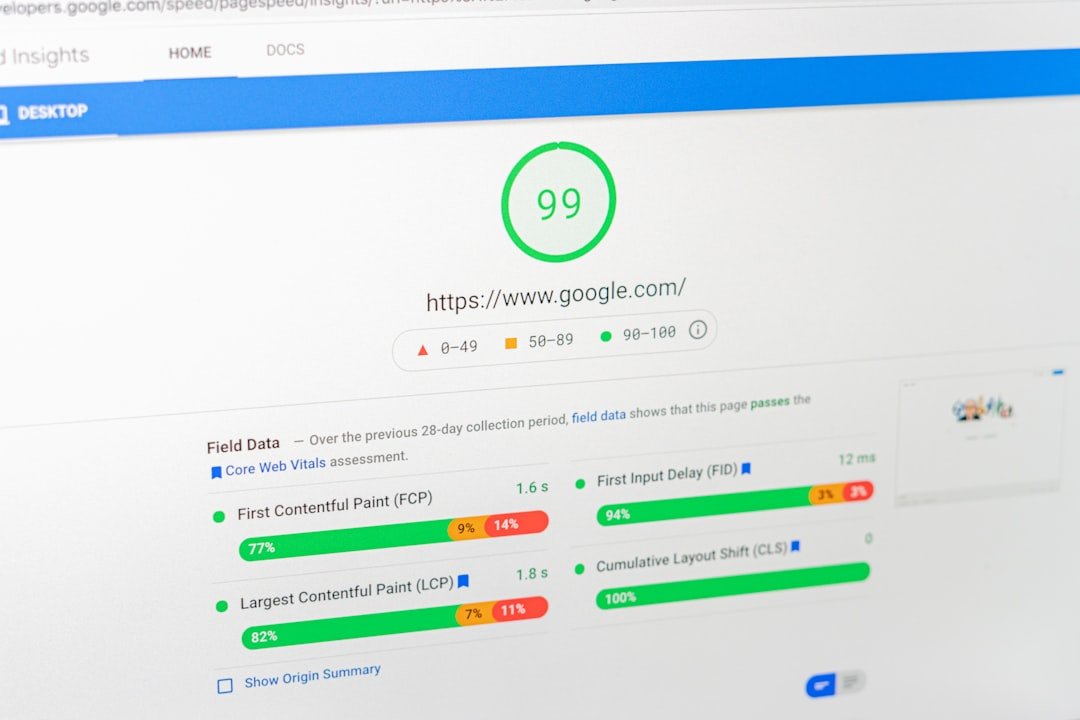
Field data reflects experiences from real users over time, such as the Chrome User Experience Report used in Search Console and PageSpeed Insights when enough data is available.
Lab data comes from a controlled test such as Lighthouse. It is useful for diagnosing specific problems, but one lab score is not the same thing as the real-world Core Web Vitals assessment.
Tools to Measure Core Web Vitals
- Google Search Console Core Web Vitals report
- PageSpeed Insights
- Chrome DevTools
- Lighthouse
- Chrome User Experience Report data where available
Common Business Website Problems
WordPress and page-builder sites often struggle because multiple performance costs accumulate: oversized images, several font families, animation libraries, chat widgets, analytics tags, plugins that load everywhere and large DOM structures.
The solution is usually not to install five optimization plugins. Audit what the page actually loads, remove unnecessary assets, configure one coherent caching/optimization system and retest important templates.
A Practical Improvement Order
- Measure real-world performance first.
- Identify the pages and templates failing Core Web Vitals.
- Fix server and caching bottlenecks.
- Optimize the main LCP element.
- Reduce JavaScript work and third-party scripts.
- Fix image, embed and font-related layout shifts.
- Retest after meaningful changes.
- Monitor field data because it takes time to reflect new user experiences.
Frequently Asked Questions
What are good Core Web Vitals in 2026?
Google’s good thresholds are LCP of 2.5 seconds or less, INP of 200 milliseconds or less and CLS of 0.1 or less, evaluated at the 75th percentile.
Will passing Core Web Vitals make me rank #1?
No. Core Web Vitals contribute to page experience, while relevance, helpful content and many other signals remain important.
Is PageSpeed Insights score the same as Core Web Vitals?
No. The Lighthouse performance score is a lab metric. Core Web Vitals are specific metrics, and Search Console primarily reports field performance from real users where sufficient data exists.
Should I optimize every page individually?
Start with templates and high-value pages. Fixing a common header, script, image pattern or page-builder issue can improve many URLs at once.
Need a Performance and Technical SEO Audit?
SEO Mind Tech can identify which templates, scripts, images and plugins are creating the largest user-experience problems and prioritize fixes by business impact. Also review our schema markup guide for another part of technical SEO.
Request a technical SEO audit.
Source
Google Search Central: Understanding Core Web Vitals and Google Search results

About the author
Nee
SEO Mind Tech publishes practical guidance on search visibility, AI discovery, performance marketing, content and web growth systems.